Owner, admin and regular users
Understanding Administrator Roles in Virtual Front Desk
When you create a Virtual Front Desk account, the email address used during registration is automatically designated as the global administrator. This role carries the highest level of access and control over the account, and it cannot be transferred or reassigned without creating an entirely new account.
Managing user roles effectively is essential to maintaining security and ensuring that team members have access to the features they need. By default, all newly added users are assigned a regular user role, which provides limited access to the platform's features and settings.
Understanding how to promote users to admin roles allows account owners to delegate responsibilities and streamline day-to-day management of the Virtual Front Desk platform.
How to Promote a User to Admin Role
The email address used to create a new Virtual Front Desk account will automatically be assigned as the global administrator for that account. This role cannot be transferred or changed unless a new account is created.
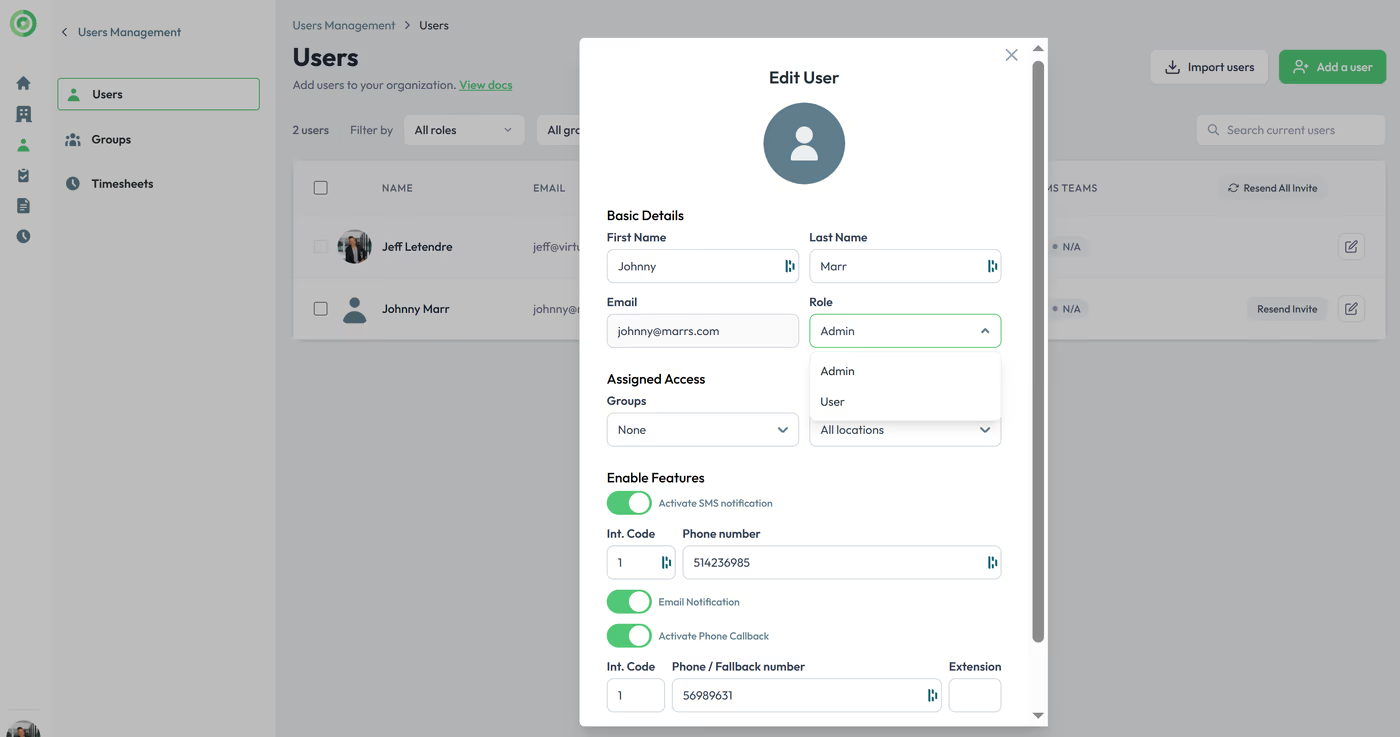
By default, all new users added to the account will have regular user roles with limited access to features. However, you can promote any regular user to an admin role by selecting "Admin" in the user’s settings under the user management section.
Key Takeaways on Account Role Management
The global administrator role is automatically assigned to the email address used to create the account and cannot be transferred or changed. All new users start with a regular user role by default, but can be promoted to admin status through the user management section by selecting "Admin" in their individual user settings.
Proper role management ensures your team has the right level of access to keep your Virtual Front Desk account running smoothly and securely.