Virtual Front Desk Performance Analytics

See What’s Happening Across Every Front Desk
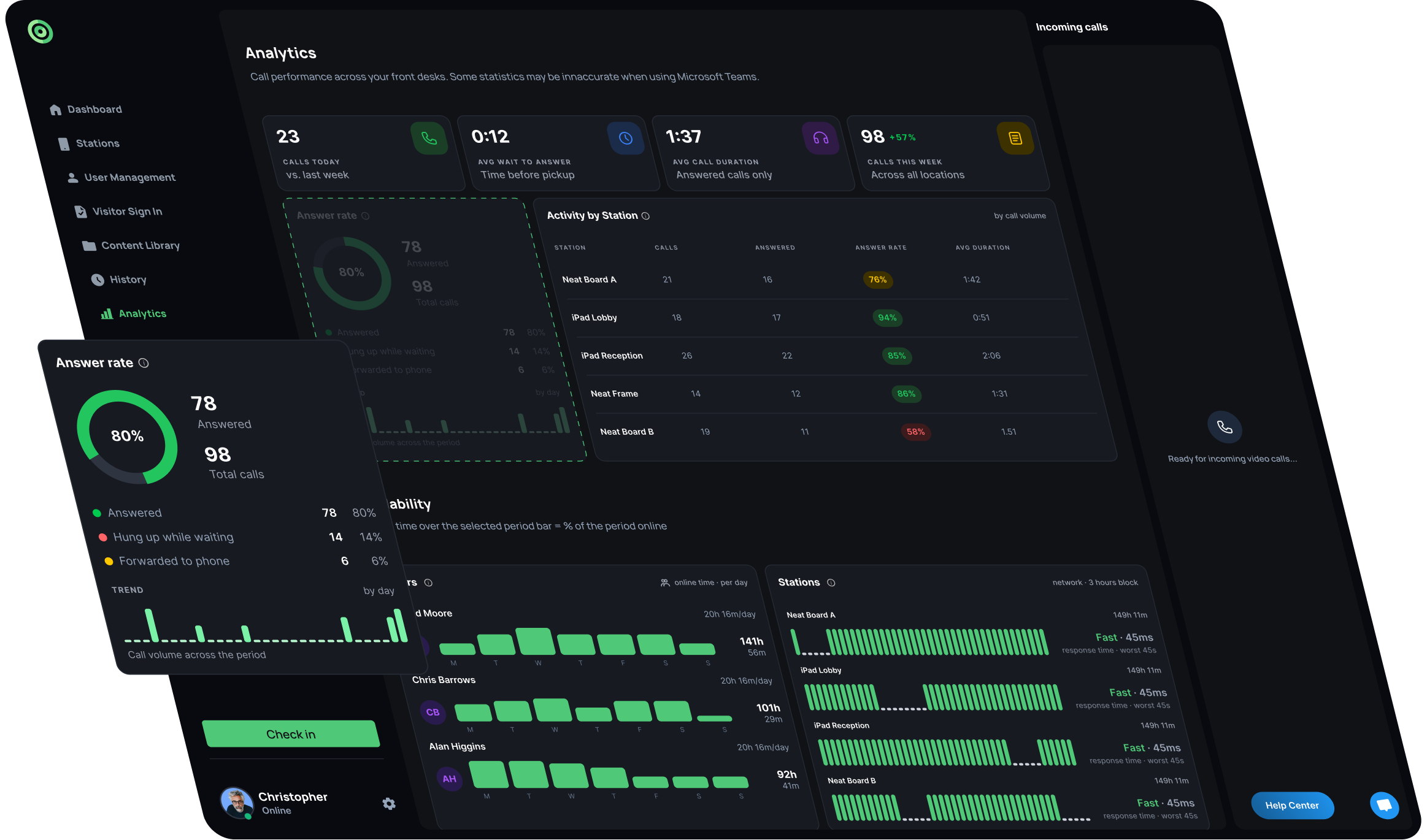
Virtual Front Desk Analytics brings performance data from your reception operations into one place. Understand how visitors are being served, compare locations, identify coverage gaps, and see how your reception team and stations are performing over time.
Turn Reception Data Into Better Decisions
Use response times, answer rates, and availability data to identify where visitors may be waiting too long or where additional coverage is needed.
Use answer-rate and wait-time data to identify where calls are being missed or abandoned, then adjust staffing or routing.
See how different front desks perform without relying on anecdotal feedback from individual sites.
Compare activity across receptionists to see who is handling the most calls and where workload could be distributed more evenly.
Track station uptime and network health across locations so you can quickly identify outages or connectivity issues before they affect visitors.
See which reception and self-service features are actually being used so you can refine workflows around real visitor behavior.
Understand How Your Front Desks Are Performing
Track call activity and response performance across every location. See how many calls visitors make, how quickly they are answered, how long interactions last, and where service levels may need attention.

See calls today, weekly call volume, average wait time, and average call duration to understand overall reception demand.

See how many visitor calls were answered, abandoned while waiting, or forwarded to another contact.

Compare call volume, answer rates, answered calls, and average call duration across individual front desk stations and locations.
Know When Your Digital Reception Is Available
Understand when receptionists and front desk stations are online so you can identify gaps before they affect the visitor experience. Compare availability across users, stations, days, and locations from one view.

See when reception staff are online and compare their availability over time to understand how consistently your team is providing coverage.

Track station uptime and network responsiveness across locations to quickly identify connectivity issues or periods when a front desk was unavailable.

Compare staff and station availability to see where reception coverage may be limited and where additional support could be needed.
Understand How Your Team and Visitors Uses Virtual Front Desk
See how individual receptionists perform and which Virtual Front Desk capabilities are used most often during visitor interactions. Use the data to understand workloads, adoption, and how reception workflows actually operate.

Compare answered calls, average call duration, wait times, pickup rates, and satisfaction across individual receptionists.

See how often receptionists use capabilities such as chat, document scanning, screen sharing, signatures, ID capture, and payments during live interactions.

See how visitors use station features including sub-menus, printing, signatures, ID capture, QR codes, and forms without receptionist assistance.

Do you have questions? Check them below
If you don't find an answer to your question, please, feel free to contact us
What does Virtual Front Desk Analytics track?
Virtual Front Desk Analytics tracks reception activity including call volume, answer rates, response times, receptionist availability, station availability, and feature usage across your Virtual Front Desk deployment.
Bringing reception activity into one analytics view helps organizations understand how their virtual front desk is performing, identify service gaps, and make data-driven decisions about staffing, coverage, and workflows.
Explore your Analytics dashboard to see how your reception operation is performing, or book a Virtual Front Desk demo to see the reporting capabilities in action.
Can I compare performance across multiple front desk locations?
Yes. Virtual Front Desk Analytics lets you compare reception activity and performance across multiple locations from one centralized view.
Multi-location reporting makes it easier to identify differences in call volume, response times, availability, and service levels between offices so teams can improve consistency across their organization.
Request a demo to see how multi-location Analytics works.
Can I see when receptionists are available?
Yes. Virtual Front Desk Analytics provides visibility into receptionist availability, helping you understand when team members are available to handle incoming reception requests.
Receptionist availability data helps organizations identify coverage gaps, understand staffing patterns, and ensure visitors can reach someone when they need assistance.
Book a demo to see how Virtual Front Desk helps manage distributed reception teams.
Can Virtual Front Desk monitor station availability?
Yes. Virtual Front Desk Analytics can provide visibility into station availability so administrators can understand whether reception stations are available and ready to serve visitors.
Station availability is an important part of reception reliability. Monitoring it helps teams identify potential service interruptions and maintain consistent virtual reception coverage across locations.
Schedule a demo to see how Virtual Front Desk supports centralized station management.
Can I compare receptionist performance?
Yes. Virtual Front Desk Analytics lets you compare receptionist activity using metrics such as answered calls, answer rates, response times, and availability.
Comparing operational metrics helps managers understand how reception coverage is distributed, identify patterns, and improve team performance without relying on assumptions about individual workload.
Use receptionist performance data to review coverage and workload distribution, or book a demo to explore the Analytics dashboard with your own reception use case in mind.
Does Analytics show which Virtual Front Desk features are being used?
Yes. Virtual Front Desk Analytics provides insight into feature usage, helping administrators understand how visitors and teams interact with the reception workflows available on their stations.
Feature usage data shows which workflows deliver the most value and which may need greater visibility, configuration changes, or adoption across locations.
Review feature usage to optimize your station experience and remove underused workflows, or request a demo to see how Analytics can help you improve your Virtual Front Desk setup.
Can Analytics help improve reception coverage?
Yes. Virtual Front Desk Analytics helps improve reception coverage by combining answer rates, response times, receptionist availability, and station availability in one view.
Analyzing these signals together helps organizations identify when and where reception coverage may be insufficient, allowing teams to adjust staffing, schedules, or workflows before service levels are affected.
Use Analytics to identify coverage gaps and optimize how receptionists support each location, or book a Virtual Front Desk demo to see how the platform can support your reception operation.

