Quick Access button
What Is the Quick Access Button?
The Quick Access button is a convenient feature found within the live video call menu, designed to help receptionists work more efficiently during active calls. It allows users to instantly open a pre-configured URL with a single click, eliminating the need to manually navigate to frequently used web tools.
This feature is especially useful in fast-paced reception environments where time is critical. By having instant access to essential web resources — such as booking systems, visitor logs, or internal dashboards — receptionists can provide smoother and more responsive service without interrupting the flow of a call.
How to Configure Your Quick Access URL
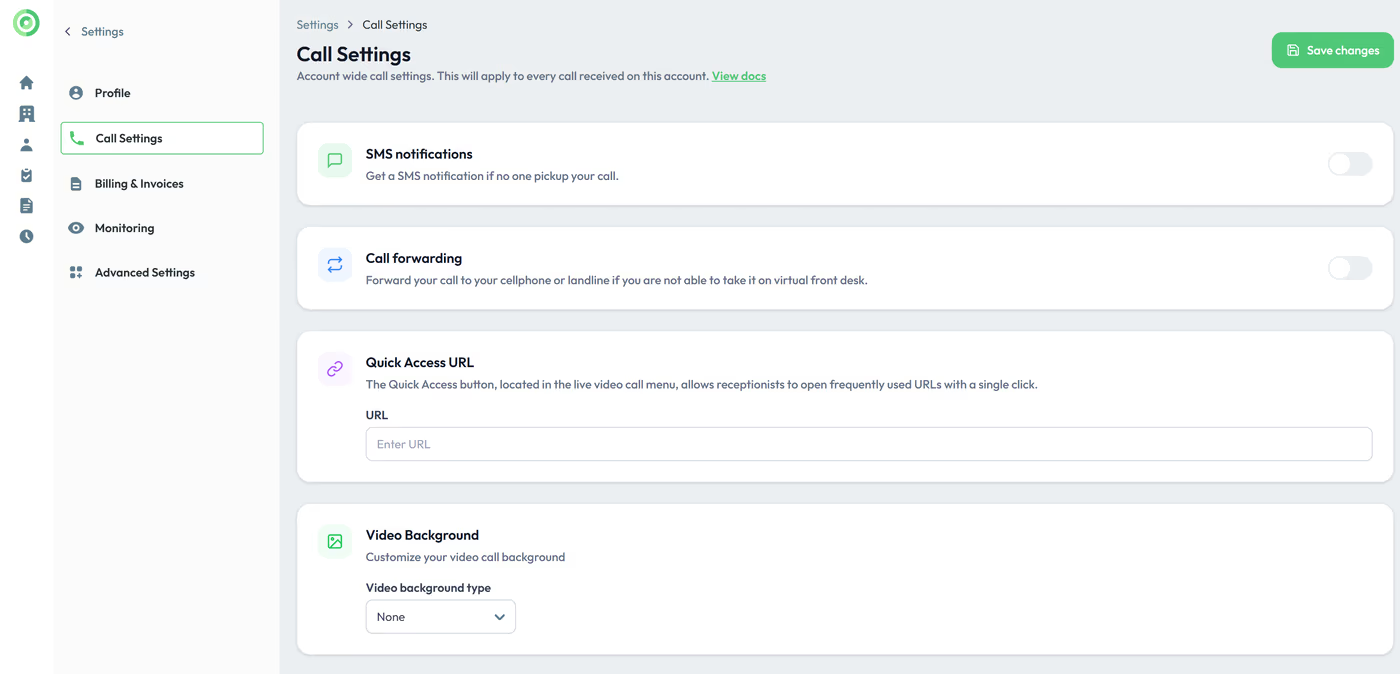
The Quick Access button is located in the live video call menu, allowing receptionists to open frequently used URLs with a single click. This makes it easy to access essential web tools seamlessly during a call.
To set your Quick Access, go to the Settings menu / Call settings and enter the full URL in the Quick Acess section.
Key Takeaways
The Quick Access button streamlines the receptionist experience by enabling one-click access to important URLs directly from the live video call menu. To activate this feature, simply navigate to Settings > Call Settings and enter the desired full URL in the Quick Access section. Once configured, the button will be available during every live call for instant use.